The Paranormal Store
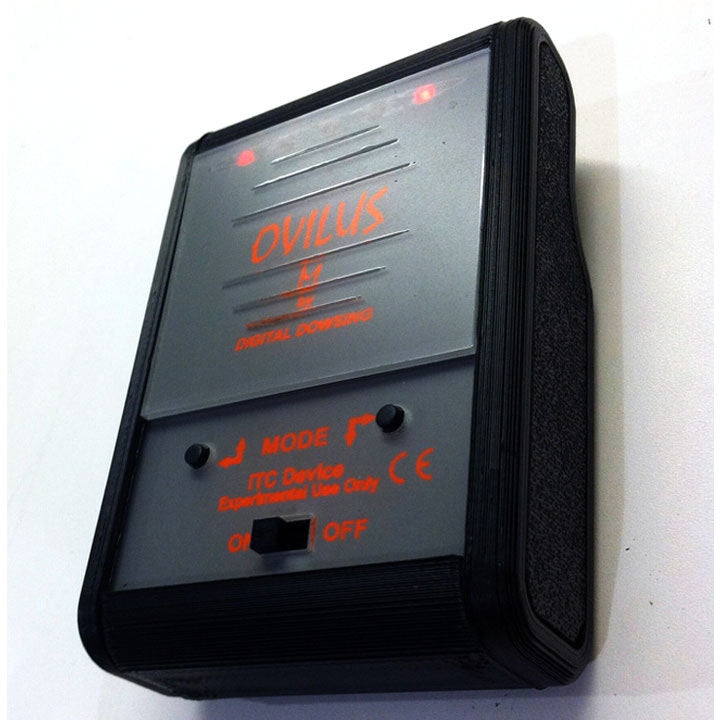
Used Digital Dowsing Ovilus M - SHIPS FREE
Used Digital Dowsing Ovilus M - SHIPS FREE
Regular price
$200.00 USD
Regular price
Sale price
$200.00 USD
Unit price
per
Couldn't load pickup availability
Overview of the Ovilus M
This pocket sized Ovilus M is a smaller Instrumental Trans-Communication device. The Ovilus M ITC device converts environmental readings into words. • Internal speaker • Requires 3 AAA batteries.
Ovilus M Modes
- Mode 1: Dictionary Mode – Words are created out of the on-board database, based on environmental values.
- Mode 2: Phonetic Mode 1 – Speech is formed by using phonemes, the basic blocks of human speech.
- Mode 3: Phonetic Mode 2 – Speech is formed by using phonemes, the basic blocks of human speech. White Noise added.
- Mode 4: Reverse Phonetic Mode 1 – Speech is formed by using phonemes, the basic blocks of human speech then played in reverse order.
- Mode 5: Reverse Phonetic Mode 2 – Speech is formed by using phonemes, the basic blocks of human speech then played in reverse order. White Noise added.
- Mode 6: Touch Mode – The Ovilus M will make a ping sound when touched.
- Mode 7: Voice Change Mode – This mode is similar to dictionary mode (2048 words), however the environment can also change the pitch and speed of the spoken voice. To CLEAR, turn the Ovilus M off and back on.
- Mode 8: Say Last Word Said – The Ovilus M remembers the last 100 words; in this mode it will say them, starting with the LAST word it spoke. The list goes back up to 100 words. The words will be cleared out if the Ovilus M is turned off.
Setup the Ovilus M:
- The Ovilus M requires 3 AAA batteries, not included. Make sure to use high quality, brand name lithium batteries.
- Carefully remove back cover and install batteries in their proper orientation; note the + and – of the batteries.
- The Power Switch is on the front of the Ovilus M. To turn ON, slide the switch to the left. To turn OFF, slide to the right.
- The Ovilus M will announce the current mode it is in.
To change modes:
Press the Mode buttons on the front.
(Note: when changing modes, hold the mode button down until the Ovilus M begins to announce the next mode.)
To set the sensitivity or Gain
- Hold down either the left or the right mode button and power on.
- User can set sensitivity from 1 to 10.
- To increase, press the right arrow.
- To decrease, press the left arrow.
- When desired level is set, turn off.